

In a busy warehouse, delivery route, or retail floor, every second counts. A slow or missed scan can mean lost time, errors, and frustrated customers. A PDA barcode scanner solves this by combining a fast, accurate 2D scan engine with the mobility of an Android handheld—so you can capture, process, and send data anywhere, in real time.
In this guide, you’ll quickly learn what a PDA barcode scanner is, how it works, and the core functions that make it essential for modern operations. We’ll explore key applications in warehousing, logistics, retail, manufacturing, field service, and ticketing. You’ll see how it compares to RFID, discover top brands and models for 2025, and get setup, maintenance, and buying tips. Finally, we’ll answer common questions and help you choose the right device to boost accuracy, speed, and productivity.

What is a PDA Barcode Scanner?
A PDA barcode scanner is a handheld mobile computer with a built-in scan engine for reading 1D and 2D barcodes. It combines the functions of a barcode reader, data processor, and wireless communicator in a single device. Most modern models run on Android OS, offering touchscreen control, app support, and fast connectivity.
Inside, it works like this: the scan engine captures the barcode image, decodes the data, and sends it directly to your system through Wi-Fi, Bluetooth, or 4G LTE. Compared with a basic handheld scanner, a PDA scanner can store and process data on the spot, run inventory or logistics apps, and sync in real time with cloud platforms.
Key features you will often find in a PDA barcode scanner include:
- Integrated 2D scan engine for barcodes and QR codes
- Android handheld interface with touchscreen and optional physical keypad
- Wireless connectivity through Wi-Fi, Bluetooth, and LTE
- Rugged housing for warehouse or field service environments
- Long battery life for full-shift operations
In short, it is not just a scanner. It is a rugged Android handheld computer built to scan, process, and transmit barcode data wherever your team works.
Core Functions of a PDA Barcode Scanner

A PDA barcode scanner is designed for fast, accurate data capture in demanding workflows. Its 2D scan engine reads both 1D barcodes and QR codes in a split second—even if labels are small, bent, or low-contrast. Premium modules like Zebra SE4710 or Honeywell HS7 lock onto codes quickly and confirm each read with beep, LED, or vibration feedback.
Because it runs Android apps, you can check inventory, pick orders, or confirm deliveries directly on the handheld—no PC needed. Data updates instantly in your WMS or ERP, or stores locally in batch mode if the network drops, syncing later without losing productivity.
Connectivity keeps work moving. Dual-band Wi-Fi enables smooth roaming across access points. Bluetooth pairs with label printers and headsets. 4G LTE keeps field teams connected on the road. Integration is straightforward via keyboard-wedge, serial, or SDK/API modes.
Comfort matters on long shifts. A balanced design, optional pistol grip, and programmable keys reduce strain. The touchscreen suits modern apps, while a physical keypad helps in cold rooms or bright outdoor sites.
Ruggedness ensures uptime. IP65 sealing, reinforced glass, and recessed windows protect against dust, water, and drops—ideal for docks, freezers, or busy sorting centers.
Battery design supports full-day work. Large-capacity packs, quick charge, and hot-swap options keep it running through multiple shifts without downtime.
At scale, management and security are built in. Android Enterprise enrollment, MDM policies, and kiosk mode lock devices to your workflow. Regular updates protect data, while remote diagnostics and asset tracking reduce maintenance costs.
Checklist before buying
- Scan speed & accuracy on damaged/tiny labels
- Wireless stability (Wi-Fi, Bluetooth, LTE)
- Integration with your WMS & label printers
- Rugged rating for your environment
- Battery swap & charging strategy
How a PDA Barcode Scanner Works
A PDA barcode scanner follows a fast, three-step process:
- Capture: The device projects light onto the label and records its pattern using an imager or laser.
- Decode: The built-in processor converts the captured image into barcode data, even from small, curved, or partially damaged codes.
- Send: The decoded data is passed to your Android app or warehouse system, updating inventory, confirming orders, or triggering tasks.
This all happens within the same handheld unit, no separate computer required. Data is then sent via Wi-Fi, Bluetooth, or 4G LTE, depending on your location, so workflows stay smooth: fast read, quick confirm, instant sync.

Main Application Scenarios for PDA Barcode Scanners
PDA barcode scanners are widely used across industries to scan, process, and share barcode data in real time. From warehouse inventory checks to event ticket validation, these rugged Android handheld devices improve accuracy, speed, and workflow efficiency wherever items, assets, or people need to be tracked.
Warehouse and inventory management relies on fast, accurate scanning for stock counts, put-away, picking, and location checks. A rugged Android handheld with a high-speed 2D barcode reader lets staff update inventory in real time over Wi-Fi. Errors drop, and every movement is tracked without slowing the shift.
Logistics and express delivery teams use PDA scanners to register parcels at pickup, track them through sorting hubs, and confirm deliveries. 4G LTE keeps the device connected on the road, while Bluetooth links to portable printers for instant labels or receipts.
Retail operations benefit from instant barcode checks at checkout, backroom replenishment, and price verification. Staff can scan products, adjust pricing in the POS, and trigger stock orders from the same mobile computer, improving both speed and customer experience.
Manufacturing plants deploy PDA scanners on production lines for batch tracking and quality inspection. Each part or product is scanned to record its stage, detect defects early, and maintain full traceability from raw material to finished goods.
Field service and inspection crews use rugged units to scan equipment IDs, log maintenance, and upload reports from remote sites. In sectors like energy or petrochemicals, the rugged build and sealed design ensure reliable operation in dust, moisture, and extreme temperatures.
Event and ticket validation becomes quicker and more secure with PDA barcode scanners at gates. Staff scan paper tickets or digital QR codes, check them against the system instantly, and manage entry flow without bottlenecks—ideal for exhibitions, concerts, or transport hubs.
PDA Barcode Scanner vs RFID
A PDA barcode scanner reads printed barcodes with optics, while RFID reads encoded tags with radio waves. Barcodes need line of sight and handle one item at a time; RFID works without line of sight and can capture many tags at once. Both are used in warehouse, logistics, and inventory tasks, but they fit different priorities.
|
Aspect |
PDA Barcode Scanner |
RFID |
|
Working principle |
Optical reading of 1D/2D barcodes using a scan engine on an Android handheld or mobile computer; requires direct view; single-item focus. |
Uses radio frequency to power and read tags; no line of sight needed; reads multiple tags at once. |
|
Cost & adoption |
Low label cost; printers and scanners widely available; dominant in retail and warehouse workflows. |
Higher tag and hardware cost; adopted mainly for large-scale logistics and asset tracking. |
|
Best fit |
Item-level accuracy, checkout, picking, putaway, and maintenance; labels are also human-readable. |
Bulk scanning at dock doors, pallet audits, reusable asset tracking. |
|
Limitations |
Needs line of sight; slower for bulk reads. |
Sensitive to metal/liquid interference; higher cost per low-margin item; still needs barcode labels for compliance and human reading. |
In short, RFID is powerful for bulk visibility, but PDA barcode scanners remain essential for low-cost, universal, item-level identification. Most operations combine both for full coverage.
How to Choose the Right PDA Barcode Scanner
The right PDA barcode scanner should match your workflow, survive your environment, and integrate smoothly with your systems. Think in terms of the work you do, not just the features on paper.

Start with your environment. If you work in a dusty warehouse, on loading docks, or in cold storage, look for rugged Android handhelds with IP65 sealing and drop protection. Retail counters can go lighter, but harsh sites will pay back the investment in uptime.
Match the scan engine to your labels. Damaged, small, or high-density codes need a high-performance 2D scan engine. Ask vendors to scan your actual labels and share results. Near-far range and motion tolerance often matter more than max resolution.
Choose a form factor your team can use all day. Long shifts call for balanced weight and optional pistol grips to reduce fatigue. Touchscreens are great for modern apps, while a physical keypad works better in gloves or bright sunlight.
Plan your connectivity. In a single site, dual-band Wi-Fi with fast roaming is key. For on-the-road work, 4G LTE ensures real-time updates, while Bluetooth pairs with printers or other peripherals. Keep batch mode as a backup for coverage gaps.
Secure and integrate from day one. Confirm that your WMS or ERP supports the scanner via HID keyboard-wedge or SDK/API. Use Android Enterprise enrollment and MDM to lock devices to your workflow and push updates centrally.
Think about power strategy. For continuous shifts, hot-swap batteries and multi-bay chargers reduce downtime. Track battery health to replace packs before they fail mid-shift.
Final checklist before purchase:
- Test with your own labels, routes, and printers
- Check roaming and LTE coverage in real workflows
- Verify integration with live transactions
- Measure battery life over a full shift
PDA Barcode Scanner Popular Brands & Models (2025 Update)
In 2025, the PDA barcode scanner market spans from compact Android handhelds for retail counters to ultra-rugged, long-range devices for industrial yards.
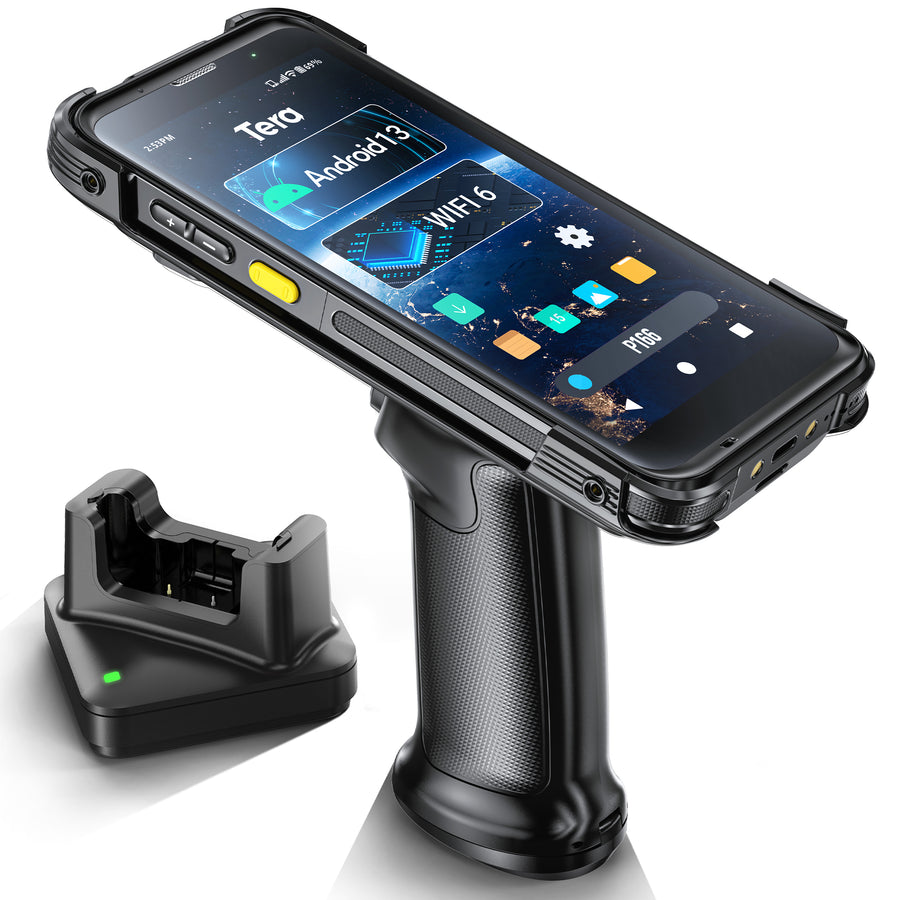
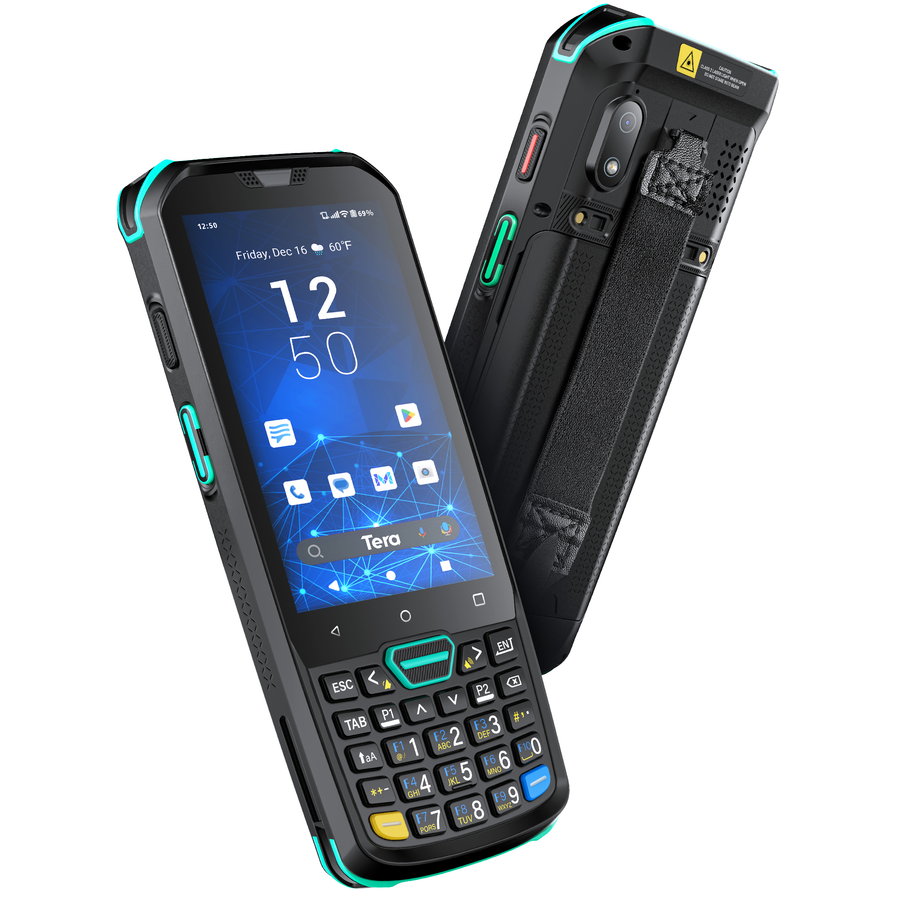
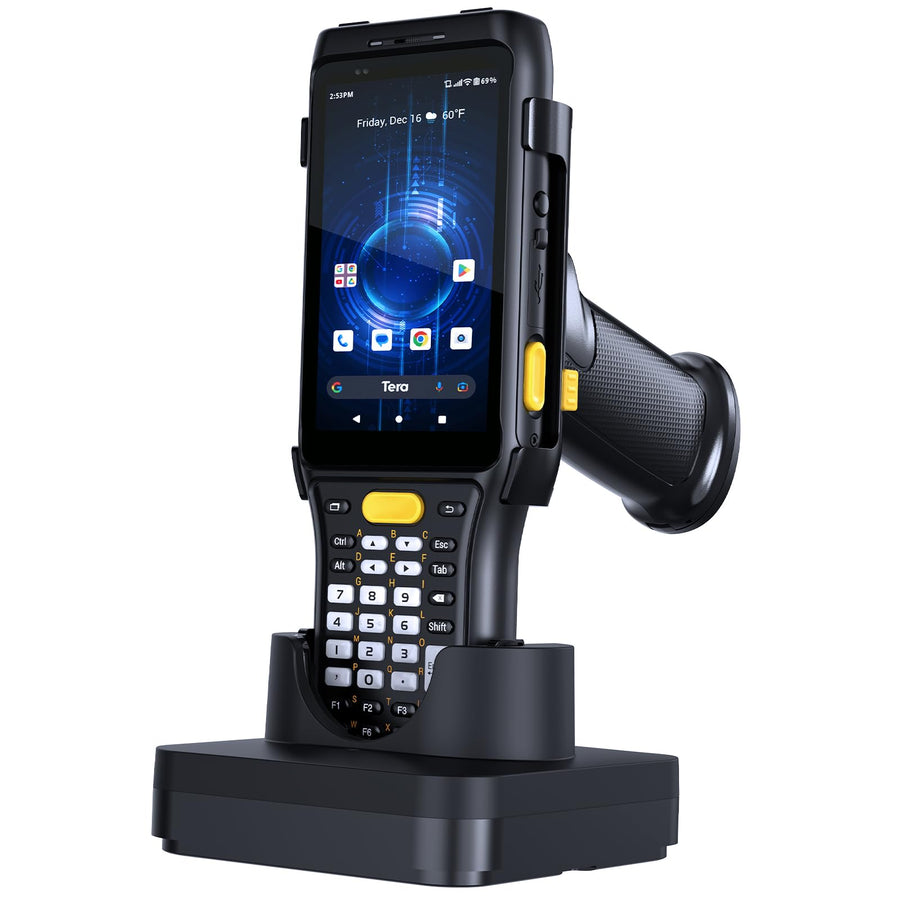
The table below lists today’s most popular brands and models, with Tera offering the full-spectrum PDA lineup covering everything from entry-level to industrial-grade long-range scanning.
Brand Overview (2025)
Tera – Delivers a complete range from cost-effective Android barcode scanners to heavy-duty rugged Android handhelds, all equipped with high-performance 2D scan engines (Zebra SE4710, Honeywell HS7, Zebra SE4750MR). Ready for warehouse, logistics, and retail deployment, and integrates seamlessly with WMS, ERP, and POS systems.
Zebra – Known for enterprise ecosystems and long OS support; TC series supports multiple scan engines and deep accessory options.
Honeywell – Built for durability and long battery life; CK series suits keypad-heavy workflows in harsh environments.
Popular Model Comparison (2025)
|
Brand / Model |
OS |
Scan Engine |
Battery |
Durability |
Key Features |
Best For |
|
Tera P166GC |
Android 13 |
Zebra SE4710 (2D) |
4300 mAh |
IP65, 1.8 m drop |
Qualcomm 6115, Wi-Fi 6, Gorilla Glass, ergonomic pistol grip |
SMB warehouses, retail, parcel sorting |
|
Tera P400 |
Android 11 |
Honeywell HS7 (2D) |
5100 mAh |
IP67, 1.8 m drop |
4GB+64GB, NFC, QC 3.0 fast charge |
Production lines, high-turnover logistics |
|
Tera P161 |
Android 11 |
Zebra SE4750MR (long range) |
6700 mAh + hot-swap |
IP65, 1.5 m drop |
Numeric keypad, GPS, up to 13 ft scan |
Industrial sites, large warehouses, cold storage |
|
Zebra TC22/TC27 |
Android 13+ |
SE4710 / SE55 |
Std / extended |
Config-dependent |
Wi-Fi 6E, 5G options, large accessory set |
Enterprise retail & warehouse |
|
Honeywell CK65 |
Android 11+ |
FlexRange / others |
Up to 28 hrs |
IP65/IP67 |
Touch + keypad, extreme ruggedness |
Harsh industrial, long shifts |
Buying Tips:
- Choose Tera P166GC for a modern Android experience, Wi-Fi 6 speed, and comfortable all-day use.
- Select Tera P400 for extra ruggedness (IP67), NFC capability, and extended battery life.
- Go with Tera P161 when you need long-range scanning in large, harsh environments.
- Opt for Zebra TC22/TC27 for enterprise-grade fleet tools and accessory depth.
- Pick Honeywell CK65 for keypad-heavy, long-shift industrial jobs.
Using and Maintaining a PDA Barcode Scanner
A PDA barcode scanner delivers its best performance when set up correctly and maintained regularly. The steps below cover first-time configuration, daily care, and quick fixes for common issues.
First-Time Setup and Configuration
Install required apps before going live. Use your company’s MDM or Google Play to load the warehouse, logistics, or retail apps that will run on the Android handheld.
Connect to Wi-Fi or 4G LTE. Enter secure credentials for your site’s network or insert a SIM card for mobile data. Test connectivity with a sample scan into your WMS or POS.
Adjust scan settings for your workflow. Configure the 2D scan engine for your preferred symbologies, add prefixes/suffixes if required, and set feedback (beep, vibration, LED) for confirmations.
Daily Maintenance
Keep the scan window clean. Wipe the lens with a microfiber cloth; use 70% isopropyl alcohol for smudges. A clean window ensures faster reads, especially for high-density or damaged barcodes.
Check rugged seals and grips. On IP65/IP67-rated units, inspect port covers and the pistol grip for wear. Make sure the battery latch is secure before a shift.
Avoid unnecessary drops and moisture exposure. Even rugged models can fail if repeatedly dropped from height or exposed to standing water. Use holsters or wrist straps when moving through the warehouse.
Common Issues and Troubleshooting
If barcodes won’t read: Clean the scan window, confirm you’re in the right app or mode, and try a known-good label. Check that the correct symbology is enabled in settings.
If connectivity fails: Verify Wi-Fi or 4G LTE status, restart the device, and test with another network. For Bluetooth issues, re-pair with the target printer or headset.
If the battery drains too fast: Reduce screen brightness, close unused apps, and check for background processes. For older batteries, consider a hot-swap replacement to keep shifts running without interruption.
PDA Barcode Scanner Pricing and Buying Channels
PDA barcode scanners generally range from $200 for entry-level models to over $1,500 for rugged, industrial-grade devices. Pricing depends on durability, scan engine performance, connectivity options, and battery capacity.
Common buying channels include official distributors for full warranty and support, Amazon for quick small-scale orders, and Alibaba for bulk purchasing.
When purchasing, check warranty terms, confirm after-sales support availability, and run a small pilot test to ensure the device meets your workflow and environment needs.

FAQs
Can I use my phone instead of a PDA barcode scanner?
A smartphone can scan barcodes with the right app, but a PDA barcode scanner has a faster, more accurate 2D scan engine, a rugged build, and battery life designed for warehouse and logistics shifts.
Do PDA barcde scanners work with my warehouse or retail software?
Most Android handhelds integrate via keyboard-wedge mode or SDK/API, making them compatible with common WMS, ERP, and POS platforms. Always confirm with your vendor before purchase.
How long does a PDA barcode scanner battery last, and can it be swapped?
Typical battery life is 8–12 hours for professional models. Industrial units often feature hot-swap designs so you can replace the battery without shutting down the device.
The Right PDA Barcode Scanner, The Right Results
The right PDA barcode scanner can speed up work, reduce errors, and keep data flowing in warehouse, logistics, and retail operations. Choosing well means matching performance, durability, and connectivity to your workflow—not just picking the most powerful device.
With decades of scanning expertise, Tera offers Android handhelds from entry-level to industrial-grade. Explore Tera’s full lineup or contact our team today to find your best-fit model and start improving efficiency.



